Backend Ecosystem Explained Simply: Follow One Request
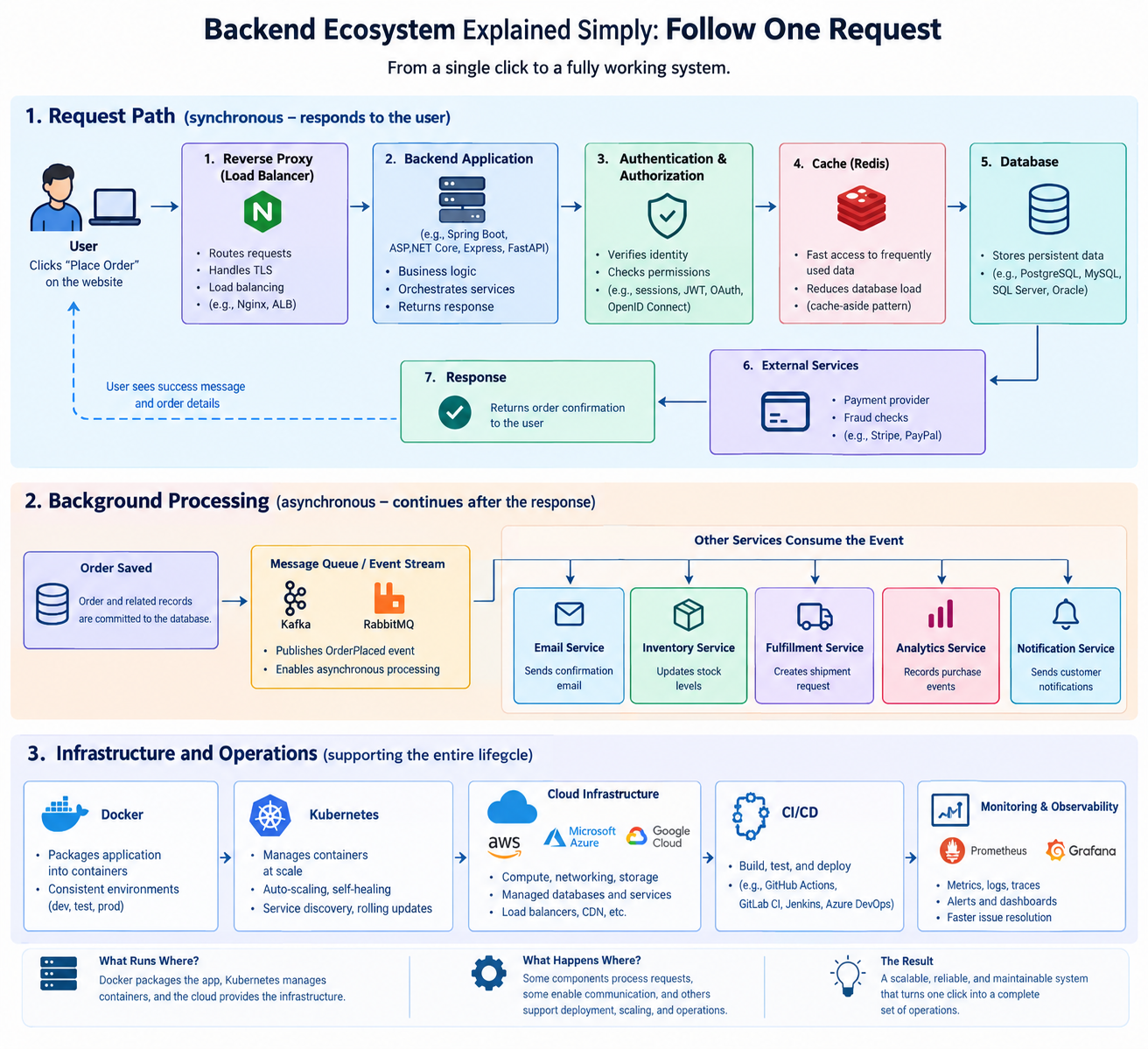
If you've ever searched for a backend development roadmap, you've probably encountered an overwhelming list of technologies: Spring Boot, Docker, Kubernetes, Redis, Kafka, PostgreSQL, Jenkins, AWS, Prometheus, and many more.
Looking at that list for the first time, it's easy to wonder: Do backend engineers really need to learn all of this?
The short answer is no. You don't need to master every technology on a backend roadmap. What you need is to understand the problems these technologies solve and how they fit into a larger system.
Once you understand why a particular category of technology exists, learning another tool in that category becomes much easier. If you understand what a relational database does, for example, learning PostgreSQL makes much more sense than memorizing its features without understanding the problem it solves.
So, instead of going through a roadmap and explaining one technology after another, let's take a different approach.
Let's follow a single request and see how the different parts of a backend ecosystem work together.
Imagine you're shopping on an e-commerce website. You find a laptop you like, add it to your cart, enter your delivery address, complete the payment process, and click Place Order.
From your perspective, it's just one click.
Behind that click, however, multiple components may work together to authenticate you, validate your order, retrieve data, communicate with a payment provider, save records, and initiate background tasks.
Let's follow that journey.
1. The Reverse Proxy: Where Requests Enter
When you click Place Order, your browser sends an HTTP request to the application's server infrastructure. The first component handling that request is often a reverse proxy, such as Nginx. A reverse proxy sits between clients and backend servers. It receives incoming requests and forwards them to the appropriate destination.
For example, an e-commerce application might route requests like these:
/productsto a product service./ordersto an order service./paymentsto a payment service.
The reverse proxy can also handle tasks such as TLS termination, routing, and request size limits. Depending on the architecture, it may distribute requests across multiple backend instances.
Why is this useful?
Imagine an application with millions of users and several backend services. You don't want every client to know the internal address of every service or how the infrastructure is organized.
Instead, clients communicate through a controlled entry point, while the infrastructure determines where requests should go.
One important distinction: a reverse proxy isn't mandatory for every application, and it isn't always the first component a request encounters. A typical production system might have a DNS lookup, a content delivery network (CDN), a web application firewall, or a cloud load balancer in front of it.
For our example, let's assume the request has passed through the relevant network infrastructure and reached the backend application.
2. The Backend: Where Application Logic Lives
So, what exactly is the backend?
The backend is the server-side part of an application. It receives requests, executes application logic, interacts with databases and external services, and returns responses. Unlike the frontend, which users interact with directly, the backend handles the operations that make the application work behind the scenes.
In our e-commerce example, the backend might need to:
- Verify that the customer is authenticated.
- Check that the shopping cart contains valid products.
- Calculate the total price.
- Confirm that the requested items are available.
- Initiate payment processing.
- Save the order and its associated records.
- Return an order confirmation.
These operations are implemented using programming languages, frameworks, libraries, and other supporting technologies.
For example:
- Java developers commonly use Spring Boot.
- C# developers often use ASP.NET Core.
- JavaScript developers might use Express or NestJS.
- Python developers frequently use FastAPI or Django.
A framework provides reusable components and conventions that help developers build applications without implementing everything from scratch.
The language and framework may differ, but the fundamental responsibility remains the same: receive requests, apply business rules, coordinate the necessary operations, and produce appropriate responses.
Now, before the backend processes our order, it needs to answer an important question. Who is making this request?
3. Authentication: Who Is Making This Request?
Anyone can send an HTTP request claiming to be a particular customer. How does the backend know that the person placing this order is actually logged in to the account they claim to own?
This is where authentication comes in.
Authentication is the process of verifying an identity. In a web application, this commonly involves validating a session or a token associated with the user.
For example, after logging in, your browser might send a session cookie with subsequent requests. Alternatively, an application might use a bearer token, such as a JSON Web Token (JWT). The backend validates the relevant credentials and establishes the identity associated with the request.
Several technologies and standards are involved in this area, but they serve different purposes:
- Session-based authentication: The server maintains session state and identifies the session using a cookie or another session identifier.
- JWT: A token format that can carry signed claims and be validated according to the application's security requirements.
- OAuth 2.0: A framework for delegated authorization.
- OpenID Connect (OIDC): An identity layer built on OAuth 2.0 that supports authentication.
These aren't interchangeable alternatives. For example, OAuth 2.0 is primarily an authorization framework, not an authentication protocol by itself.
There's also an important distinction between authentication and authorization.
Authentication answers: Who are you?
Authorization answers: Are you allowed to perform this action?
A customer may be authenticated but still not be allowed to access another customer's order. The backend must enforce that restriction before returning sensitive information or performing an operation.
If authentication or authorization fails, the backend rejects the request.
If the checks succeed, the application can continue processing the order.
4. Databases: The Application's Durable Memory
Our backend now has an authenticated customer. It needs to determine what they're ordering and where the order should be delivered.
Where does it obtain that information?
Some of it may come directly from the request. Other information must be retrieved from persistent storage. This is where a database comes in.
A database stores and organizes application data so that it can be retrieved, updated, and managed over time.
An e-commerce application might store:
- Customer accounts.
- Product information.
- Shopping carts.
- Orders and order items.
- Payment records.
- Delivery addresses.
- Inventory information.
Popular relational database management systems include PostgreSQL, MySQL, Microsoft SQL Server, and Oracle Database. These systems allow applications to store structured data and query it efficiently.
For example, a backend might execute a query to retrieve the products associated with a customer's cart or insert a new order into an orders table. Relational databases also provide transactions, which are essential when multiple database operations must succeed or fail together.
Suppose placing an order requires inserting an order record and several order-item records. A database transaction can ensure that these related changes are committed together rather than leaving an incomplete order if one operation fails.
However, a database transaction doesn't automatically make an entire checkout process atomic. If payment processing involves an external provider, that interaction cannot ordinarily be included in the same local database transaction. The application must handle failures across those separate systems explicitly.
One more distinction matters: not all information is necessarily stored in a relational database. Applications may use document databases, object storage, search indexes, and other storage systems depending on their requirements.
The key idea is that the database provides durable storage for the data the application needs to operate.
But as an application grows, repeatedly retrieving the same information from a database can become expensive.
That's where caching becomes useful.
5. Caching: Avoiding Unnecessary Database Work
Imagine millions of customers are browsing the same e-commerce website. Thousands of them may be viewing the same popular laptop. Others might repeatedly request product categories, prices, or other frequently accessed information.
If every request requires the database to perform the same work, database load can increase substantially. This doesn't mean a database necessarily becomes slow as soon as traffic grows. Databases can handle considerable workloads when properly designed and scaled.
The problem is that some repeated operations don't need to be performed from scratch every time.
A cache helps reduce that repeated work by temporarily storing data that can be reused. Redis is a popular technology used for this purpose.
Consider a customer opening a product page.
The backend first checks whether the required product information is available in the cache.
If the data is in the cache, the backend can return it without querying the database. If the data isn't in the cache, the backend retrieves it from the database and may store a copy in Redis for subsequent requests. This is commonly known as the cache-aside pattern.
The next request for the same product may then be served directly from the cache, reducing database queries and potentially improving response times.
But there's an important trade-off.
Cached data can become stale. If a product's price changes in the database while an old price remains in the cache, customers might temporarily see outdated information.
Applications therefore need a strategy for cache expiration, invalidation, or refreshing data. This becomes especially important for information such as inventory levels, prices, and account balances.
Also, the database doesn't necessarily remain the source of truth for every type of cached information in every architecture. However, in our example, Redis is acting as a temporary cache for data whose authoritative copy lives in the database.
Remember: caching is primarily a performance optimization, not a replacement for persistent storage.
And because cache hits can bypass the database entirely, not every request follows the same path.
Our checkout request, however, still has important work to do.
6. Message Queues: Separating Immediate Work from Background Work
Let's return to our order.
The backend has validated the request and completed the necessary checkout operations. The order has been recorded, and the payment process has reached the required state for confirmation.
What happens next?
Placing an order can trigger several additional operations:
- Sending an order confirmation email.
- Notifying the warehouse.
- Updating inventory.
- Requesting shipment creation.
- Recording analytics events.
- Triggering customer notifications.
Should the backend wait for every one of these operations to finish before responding to the customer?
Not necessarily.
If an email provider takes three seconds to respond, a shipping service takes two seconds, and another service is temporarily unavailable, making the customer wait for every operation would increase response time and introduce unnecessary dependencies.
Instead, applications often separate immediate request processing from work that can happen asynchronously. This is where message brokers and queues become useful.
After the order has been successfully committed, the backend can publish an event such as OrderPlaced to a messaging system. Other services can consume that event and perform their respective tasks independently.
For example:
- The order service records the order.
- It publishes an
OrderPlacedevent. - An email service consumes the event and sends a confirmation.
- An inventory service processes the event and updates stock.
- A fulfillment service begins preparing the shipment.
The customer doesn't need to wait for every downstream operation to finish before receiving an order confirmation. Technologies such as RabbitMQ and Apache Kafka can support these architectures, although they have different messaging models and capabilities.
A useful distinction: RabbitMQ is a message broker that supports queue-based messaging patterns, while Kafka is a distributed event-streaming platform. Both can facilitate asynchronous communication, but they aren't identical tools.
There is also a subtle reliability problem here.
What happens if the order is saved successfully, but the application crashes before publishing the event?
The order exists, but the downstream services may never hear about it.
Production systems often address this using patterns such as the transactional outbox, where the order and an event record are saved in the same database transaction. A separate process then publishes the event to the messaging system.
Consumers must also account for retries and duplicate deliveries. For example, processing the same inventory update twice could produce incorrect results unless the operation is designed to be idempotent. These details become important when building reliable distributed systems.
For now, remember the core principle:
Message queues and event-streaming systems help services communicate asynchronously, reducing dependencies between operations and allowing background work to continue independently of the original request.
That explains how the application processes an order. But where does all this software actually run?
7. Docker: Packaging Applications for Consistent Deployment
So far, we've discussed application logic, databases, caching, and messaging. All these components need an environment in which to run.
Consider a developer who builds a backend application on their laptop. Everything works perfectly. They send the code to another developer, who tries to run it and encounters errors because the expected runtime version is missing, a system library differs, or the environment is configured incorrectly.
This is the familiar problem known as "It works on my machine."
Docker helps address this problem by allowing applications to be packaged into containers.
A container image includes the application and the user-space dependencies it needs, such as runtime components and required libraries. Configuration can be supplied separately, and the application still depends on the host operating system's kernel and other runtime requirements. The resulting image can be used to create containers in development, testing, and production environments.
For example, a Java application might be packaged into a Docker image containing the compiled application and a compatible Java runtime. Another developer can run a container from that image without having to install the same Java runtime manually on their machine.
The same image can then be deployed to a server or cloud environment that supports containers.
This improves consistency across environments, simplifies deployment, and makes it easier to package and distribute applications.
However, containers don't guarantee identical behavior everywhere. Differences in environment variables, networking, permissions, external services, and infrastructure can still cause problems.
Docker also doesn't require every component to run in a separate container, although that is a common approach in service-oriented architectures.
The main idea is straightforward: Docker provides a consistent way to package and run applications across different environments.
Now imagine our e-commerce platform becomes much more popular. Running a single container is no longer sufficient for the workload.
How do we manage hundreds of containers across multiple servers?
8. Kubernetes: Managing Containers at Scale
Imagine a major holiday sale. Thousands of customers are placing orders, browsing products, and checking out simultaneously.
To handle the workload, the application may need multiple instances of its backend services running across several servers. But managing those containers manually introduces a new set of problems.
What happens when a container crashes?
How do you start additional instances when demand increases?
How do you replace failed instances, distribute workloads, or deploy a new version without unnecessarily disrupting the application?
This is where Kubernetes comes in. Kubernetes is a container orchestration platform. It manages containerized workloads across a cluster of machines according to a desired configuration.
For example, you can configure Kubernetes to maintain a specified number of backend replicas. If a managed workload's replicas fall below the desired count, Kubernetes works to restore that state.
It can also support service discovery, load balancing, rolling deployments, and horizontal scaling, depending on how the application and cluster are configured.
For applications that experience changing traffic, autoscaling policies can increase or decrease the number of running replicas based on metrics and configured limits. This reduces the need for engineers to manage every container manually.
However, Kubernetes doesn't automatically make every application scalable or guarantee that every failure will be recovered from successfully. Applications, resource limits, health checks, storage, and scaling policies must all be configured appropriately.
It's also worth noting that Kubernetes is not required for every backend application. A small application might run perfectly well on a single virtual machine or a managed application platform.
Kubernetes becomes useful when the operational requirements justify the additional complexity.
A simple way to remember the relationship is:
- Docker provides tools for building and running containers.
- Kubernetes orchestrates containerized workloads across a cluster.
With the application packaged and its runtime environment managed, we can now look at the infrastructure that hosts it.
9. Cloud Infrastructure: Where Applications Run
Where are these servers actually located?
Traditionally, organizations purchased physical servers, installed them in data centers, and maintained the hardware, networking, power, and cooling themselves. Today, many organizations rent computing resources from cloud providers instead. Popular providers include Amazon Web Services (AWS), Microsoft Azure, and Google Cloud.
These platforms offer services such as:
- Virtual machines for running applications.
- Managed databases for persistent storage.
- Object storage for files and other data.
- Networking services for connecting application components.
- Load balancers for distributing incoming traffic.
- Managed container platforms and orchestration services.
For example, our e-commerce application might run on cloud-hosted virtual machines or a managed container platform. Its database might run as a managed PostgreSQL service, while product images are stored in object storage and delivered through a CDN.
This means the company doesn't necessarily need to purchase and maintain physical servers to operate its application.
Cloud infrastructure can also make it easier to provision resources, scale workloads, and distribute applications across different availability zones or regions.
But cloud computing doesn't eliminate infrastructure management. Teams still need to consider security, networking, access controls, reliability, resource limits, and cost. Nor does using Kubernetes automatically mean an application must run in the cloud. Kubernetes can also run on infrastructure managed directly by an organization.
These are separate architectural decisions.
The important point is that cloud infrastructure provides the computing, storage, and networking resources on which applications and their supporting services run.
We've now seen how the application can be built, packaged, and hosted.
But how do developers get new code into production safely?
10. CI/CD: Delivering Software Changes Reliably
Software development doesn't end when an application is deployed. Developers constantly fix bugs, introduce features, improve performance, and update dependencies.
Imagine manually copying application files to production servers every time a developer makes a change. The process would be repetitive, slow, and vulnerable to human error.
Instead, engineering teams often use CI/CD pipelines to automate the steps between writing code and releasing it.
Continuous Integration (CI) involves frequently integrating code changes and automatically running checks, such as compilation and tests, to identify problems early.
Continuous Delivery means keeping changes in a releasable state, with deployment to production typically requiring an approval or other explicit decision.
Continuous Deployment goes further by automatically releasing changes that pass the required checks to production.
Tools such as GitHub Actions, GitLab CI/CD, Jenkins, and Azure DevOps can help implement these workflows.
Consider a developer who fixes a bug in our order service.
A typical pipeline might:
- Retrieve the latest code from version control.
- Compile the application.
- Run automated tests.
- Build a Docker image.
- Publish the image to a container registry.
- Deploy the new version to a testing environment.
- Run additional verification checks.
- Deploy to production according to the team's release policy.
Not every pipeline follows these exact steps, but the principle is the same: automate repeatable tasks so that changes can be validated and released consistently.
CI/CD can reduce manual errors and accelerate delivery, but it doesn't guarantee that every release will be defect-free. The quality of the tests, deployment strategy, monitoring, and rollback procedures still matters.
For our e-commerce application, this means developers can improve the order service without manually rebuilding and deploying the entire system every time.
But once the new version is running, how do engineers know whether it's actually working correctly?
11. Monitoring and Observability: Knowing When Something Goes Wrong
Our application is now running in production. Customers are placing orders, databases are processing queries, and background services are handling events. But production environments are unpredictable.
A database might become overloaded. A downstream service might stop responding. A deployment might introduce a bug that increases response times.
If engineers wait for customers to report these problems, the damage may already be significant. This is why production systems need monitoring and observability.
Monitoring helps engineers track the health and performance of an application using metrics, logs, alerts, and other signals.
For example, engineers might monitor:
- HTTP request rates and error rates.
- API response times.
- CPU and memory utilization.
- Database query performance.
- Cache hit rates.
- Queue depth and message processing delays.
- Failed payment attempts.
- The number of orders successfully processed.
Tools such as Prometheus and Grafana are commonly used for metrics collection and visualization.
Prometheus collects and stores time-series metrics. Grafana can visualize those metrics through dashboards and can also help teams explore data from other supported sources.
For example, if the order service starts responding slowly, engineers might use a dashboard to determine whether CPU utilization has increased, database queries are taking longer, or messages are accumulating in a queue.
Logs provide additional details about individual events, while distributed tracing helps engineers follow a request as it travels across multiple services.
Together, these signals help teams investigate problems and understand system behavior. Alerting rules can notify engineers when important thresholds or conditions are met.
One distinction is worth remembering: monitoring and observability overlap, but they're not identical. Monitoring helps detect known failure conditions, while observability involves using system outputs such as metrics, logs, and traces, to investigate behavior that may not have been anticipated.
And none of these tools guarantees that engineers will detect every problem before customers notice. Their effectiveness depends on what the team measures, how alerts are configured, and how quickly people can respond.
The goal is to identify issues, understand their causes, and restore reliable service as quickly as possible.
We've now followed our request through the major components of a typical backend ecosystem.
Let's put everything together.
12. The Complete Picture: How Everything Connects
From the customer's perspective, placing an order was just one click.
Behind that click, the application had to authenticate the user, validate the order, interact with persistent storage, coordinate payment processing, and initiate additional tasks.
Here's how the technologies we've discussed fit into the broader picture.
The request path
- Reverse proxy or load balancer: Receives incoming traffic and routes it to the appropriate backend destination.
- Backend application: Executes the business logic required to process the request.
- Authentication and authorization: Establish the user's identity and determine whether the requested action is permitted.
- Cache: Provides fast access to eligible, frequently requested data when a suitable cached copy exists.
- Database: Stores and retrieves the application's persistent data and records the order.
- External services: Handle operations such as payment authorization when required by the checkout workflow.
- Response: Returns the appropriate result to the client once the required synchronous operations have completed.
Not every request uses every component. For example, a product-page request may benefit from caching, while an order-placement request requires additional validation and transactional safeguards.
The background processing path
After the order has been committed, the application can publish an event to a messaging system. Other services consume that event and perform tasks such as sending emails, updating inventory, and initiating fulfillment.
This work can continue independently of the original HTTP request, subject to the application's delivery guarantees and failure-handling mechanisms.
The infrastructure and operational layer
Docker packages the application into container images. Kubernetes, when used, manages containerized workloads across a cluster. Cloud infrastructure supplies the computing, networking, and storage resources.
CI/CD pipelines automate the process of testing, building, and deploying changes. Monitoring and observability tools help engineers understand the application's behavior after deployment.
These components support the application throughout its lifecycle rather than necessarily participating directly in every individual request.
That's the crucial distinction: some technologies process requests, some support communication between services, and others make the system easier to deploy, scale, and operate.
They solve different problems, but they work together to support one application.
Final Thoughts: Stop Memorizing Technologies. Start Understanding Problems.
Backend roadmaps look overwhelming because they present many different technologies at once.
But these technologies aren't simply a random collection of tools. Most exist because engineers encountered a recurring problem and developed a way to solve it.
- Reverse proxies help route and manage incoming traffic.
- Backend frameworks provide reusable structures for application logic.
- Authentication and authorization protect access to application resources.
- Databases provide persistent data storage.
- Caches reduce repeated work and improve access times.
- Message brokers and event-streaming platforms enable asynchronous communication.
- Docker provides a consistent way to package applications.
- Kubernetes orchestrates containerized workloads.
- Cloud platforms provide computing, storage, and networking resources.
- CI/CD pipelines automate software validation and delivery.
- Monitoring and observability help engineers understand and maintain production systems.
The specific technologies will vary between organizations. One company might use Spring Boot while another uses ASP.NET Core. One team might choose PostgreSQL, while another uses MySQL. An organization might use RabbitMQ, Kafka, a managed queue service, or no message broker at all.
These choices depend on the application's requirements, the team's expertise, operational constraints, and the complexity the organization is prepared to manage.
You don't need to learn every technology before you can build a useful backend application.
Start with the fundamentals. Learn how HTTP requests work, how backend applications process them, how databases store data, and how to design reliable application logic.
Then introduce additional technologies when you encounter problems they can solve.
The next time you look at a backend roadmap, don't just ask:
Which technology should I learn next?
Ask a more useful question:
What problem does this technology solve, and under what circumstances would I need it?
Once you start thinking this way, backend development becomes less about memorizing technology names and more about understanding how systems work.
About the author
- I'm an experienced Java developer, technical writer, AI Automation & Agentic Systems Engineer and SEO & GEO Specialist
Comments
Join the discussionThe split between the request path and the tools used to deploy it is helpful. It gives a beginner a way to place Docker and CI/CD in the picture without imagining every request travels through them.
Exactly! Understanding that separation makes the entire backend ecosystem easier to reason about.